Turnkey, white-label business AI
A business AI answering service under your brand.
Offer business subscribers an AI that answers calls, responds to SMS and chats with website visitors. Each business has a dedicated number, its own agent and a workspace for its creator and authorized staff.
Launch with answering, intake and notifications. Expand into connected business workflows using the same AI Agent Builder platform.

The initial subscription: answering, intake and follow-up
The operator supplies a branded service that businesses can configure around their own role, services and handling rules. Customer conversations become usable requests for staff, with context retained across connected channels.
- 01
Customer contacts the business
A call, text or website message reaches the business’s agent.
- 02
Agent handles the request
Uses the greeting, instructions, knowledge and available contact context.
- 03
Staff receive the outcome
Configured notifications and conversation records support follow-up.
- 04
Creator refines the service
Reviews handling and updates the agent’s instructions and knowledge.
- Answer questions from the business’s instructions and supplied knowledge
- Capture names, requests, contact details and preferred next steps
- Continue a recognized contact’s conversation across calls and texts
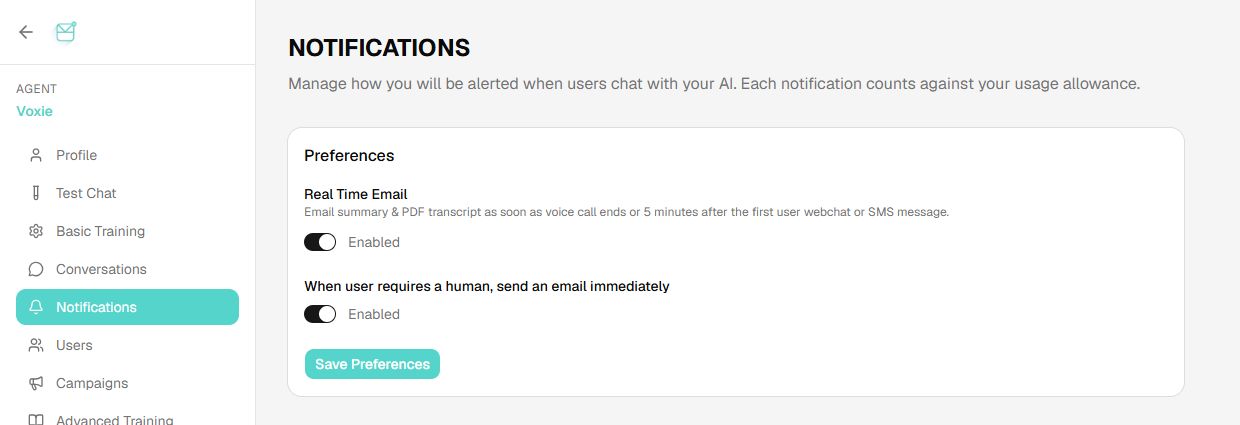
- Send configured summaries and human-assistance notifications
- Give verified creators access to conversation review and permitted follow-up tools
One business agent, different access for each relationship
Customers contacting the business
The agent answers questions, captures requests and uses relevant contact history. Customers receive the services permitted by the business’s instructions.
Verified creator and staff
Authorized team members review conversations, direct follow-up and use management tools according to their role. Creator access can update instructions, voice and notification settings.
- A persistent AI for each business
- Each business has its own agent, saved instructions, greeting, voice and knowledge within its workspace.
- Contacts and conversation memory
- Recognized contacts keep their context across sessions and connected channels. A customer can call, then text to continue the conversation.
- Creator and team controls
- Verified creators review conversations across contacts, send SMS and notification emails, and change instructions or voice. Staff access follows assigned permissions.
- Tools scoped to each workspace
- Business credentials, connected systems and action permissions belong to the business workspace. Staff and customer interactions receive the access appropriate to their roles.
The workspace behind the operator’s business service
Business creators manage their assistant through a branded workspace. The operator selects the controls exposed in each package, while team permissions govern access to conversations, settings and connected tools.
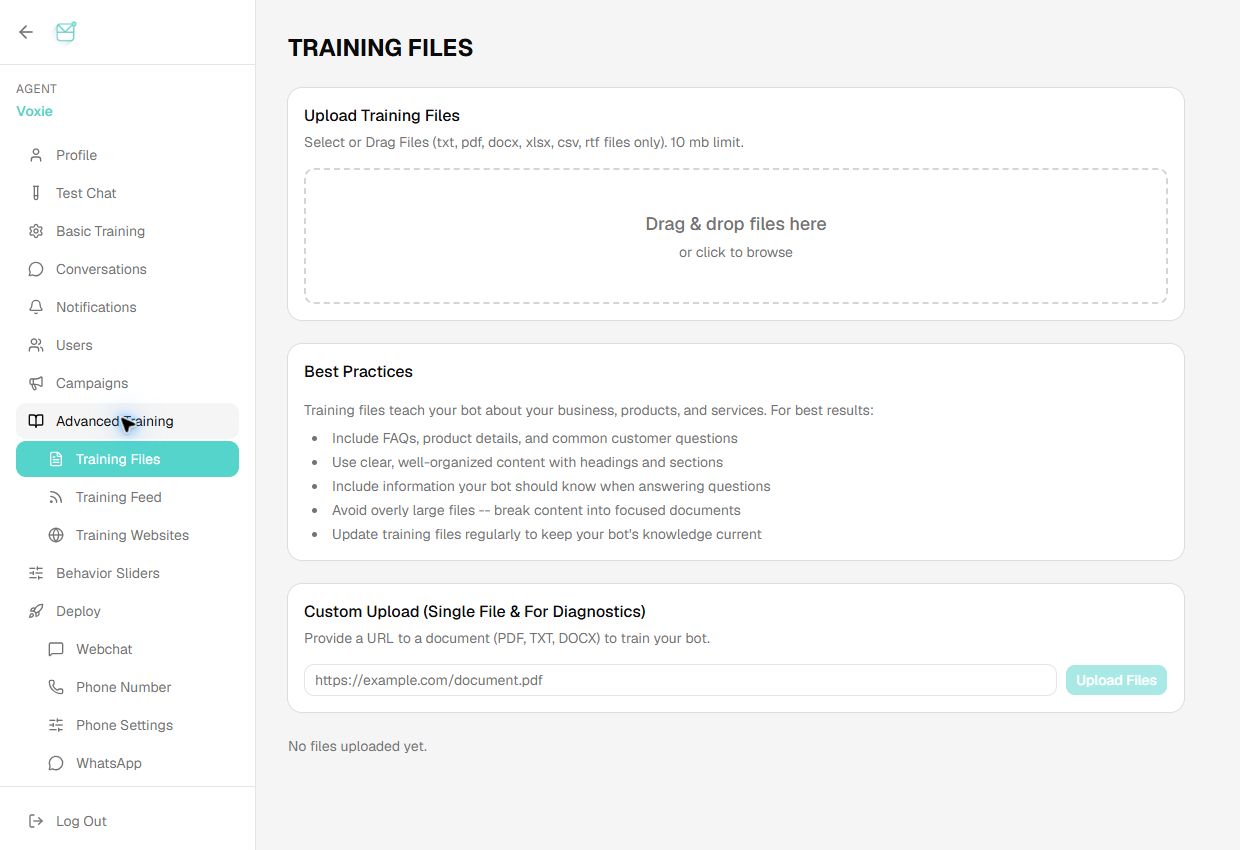
Screens show the existing AI Agent Builder application, operated through Messages Improved. Operator-branded deployments present the selected creator controls under the operator’s identity.
Instructions and behavior
A role the business creator can define
Saved instructions define behavior; approved knowledge supplies facts; tool permissions determine which actions the agent can perform.
The creation form above shows the greeting and system-prompt controls. Creators can refine saved instructions as the business’s handling rules change.
Represent the business on calls, SMS and web chat. Answer questions using the supplied service information. Capture the customer’s name, contact details, service address and request. Ask whether the request needs urgent attention. Notify staff when a person is needed. Use only approved booking links or connected tools.
Business knowledge management
Conversation and assistance notifications
From answering requests to acting in business software
The answering service gives the operator a starting business subscription. Connected workflows add read and write access to selected business systems, extending the same agent into intake, scheduling and ongoing customer operations.
- 01
Read relevant business data
Look up an existing customer, case or service record through an authorized interface.
- 02
Handle the conversation
Use that information with the agent’s instructions and contact history.
- 03
Write an approved outcome
Create or update the selected booking, lead, job or case record.
- 04
Continue the workflow
Use agreed events and follow-up rules to keep the business team informed.
Each integration defines system access, credentials, field mapping, permitted actions and error handling. These are scoped services around the shared agent platform.
Business workflows built on the platform
Existing home-services and legal case studies show the path from answering a customer to taking action in the business’s software. They give operators concrete starting points for a vertical offer.
Home services
ServiceTitan- Initial answering service
- Answer calls and texts, capture the job request and service address, and notify the team.
- Connected workflow
- The Ella case describes customer lookup, intake, customer/location creation and booking a job into ServiceTitan.
Legal services
Filevine- Initial answering service
- Capture a prospective client’s inquiry, gather intake details and route the request to the firm.
- Connected workflow
- The Grace case describes intake, signing and treatment follow-up, with conversations recorded back to the Filevine matter.
Additional vertical offerings: real estate · marketing and lead handling.
Built to work with the operator’s technology and delivery partners
An operator can bring its existing software vendor, systems integrator or internal development team. The AI Agent Builder provides the agent application layer; the operator and its partners connect the selected network, digital channels and business systems through agreed APIs and interfaces.
- Existing network and subscriber systems
- Connect operator-provided numbers, voice routing, messaging, provisioning and billing. Service access and retail entitlements stay aligned with the operator’s systems.
- Existing portals and applications
- The development partner can connect an existing customer portal or build a branded experience around platform APIs. The supplied creator workspace is another route to self-care.
- Business software and workflows
- The operator’s partner can develop selected adapters and workflows using authorized APIs and tools, with business-specific credentials and permissions.
- Deployment and delivery ownership
- Run the application and business data in an agreed hosted or operator-cloud environment. Assign integration, security review, support and release responsibilities across the delivery team.
The integration design establishes available interfaces, identity mapping, access controls and operating responsibilities. Model-processing locations are agreed separately from application hosting.
How the operator delivers the service
- Operator
- Packages the branded service, provisions business workspaces and numbers, sets usage entitlements and connects subscriber billing.
- Business creator
- Configures the agent’s greeting, instructions, knowledge and notifications; assigns authorized staff access.
- Customers and staff
- Customers use calls, SMS or web chat. Staff review requests and perform permitted follow-up in the business workspace.
A recurring business subscription
The operator sets retail pricing, usage allowances and capability tiers. A starting package can cover answering and intake; team access, connected tools and integration work extend the offer as business needs grow.
Platform and engagement pricingHosted or operator-cloud deployment
The platform and business data can run in the operator’s Azure, AWS, GCP or other agreed cloud environment. Data access, retention and model-processing locations are established for the deployment.
Hosting and data boundariesThe complete subscriber AI stack · POC and implementation roadmap
Operator questions
Can our existing software vendor or development partner build around the platform?
Yes. The operator can retain its development partner or systems integrator to connect network and billing systems, build selected digital experiences and develop business integrations around the platform APIs. We supply the AI Agent Builder and agreed technical support or managed delivery. Interfaces, credentials, permissions and responsibilities are established together.
What can a business use before connecting its CRM or other software?
After operator provisioning and agent configuration, the business can use answering, knowledge-based questions, intake, conversation history and configured notifications. Writing into a CRM, booking system or case-management platform requires the selected integration and permissions.
How does Business AI differ from personal AI and AI voicemail?
Personal AI helps the subscriber directly; AI voicemail represents the subscriber to callers. Business AI combines those roles in a business workspace with a dedicated number, team permissions and connected business tools.
Does every dedicated number require a business package?
No. A personal subscriber can have a dedicated AI number. The business package adds a business workspace, team access and permissions for business systems and tools.
Can the platform run in the operator's infrastructure?
Yes. The platform and data stores can be deployed in the operator's Azure, AWS, GCP or other agreed cloud environment. Model-processing locations are agreed separately: externally hosted speech or language services can still process data outside that environment, while local models can be selected and validated where required.
How can an operator charge for Business AI?
Package a monthly business subscription with included voice and messaging usage, then add usage allowances, team access and connected tools. Operator platform fees, workspace charges, communications costs and integration services are agreed separately from retail pricing.
Can businesses manage their own agents under our brand?
Yes. White-label engagements include the customer-facing AI Agent Builder and separate business workspaces. Creators configure their agents and review conversations; partner administration, provisioning, branding and integration scope are agreed for the deployment.
Which business tools can it connect to?
Connect the selected business systems through authorized APIs and function calls. Tool scope, credentials and permissions are set for each business. Third-party and MCP-based integrations are scoped to the selected deployment.
Scope an operator-branded business AI service
A first discussion can identify the business segment, existing delivery partners, launch channels and initial integration scope.