Calls and missed-call handling
The assistant answers calls, asks why someone is calling, captures messages and follows the configured screening or transfer rules. Creators receive the details without listening to every call.
Calls, SMS and website chat
An AI assistant for the communication work you or your team handles: answering calls, replying to texts and chatting with website visitors.
Its instructions read like a job description: the role, responsibilities and when to involve a person.
The same agent remembers recognized contacts across connected channels and assists its creator privately.
Available through our Messages Improved platform.
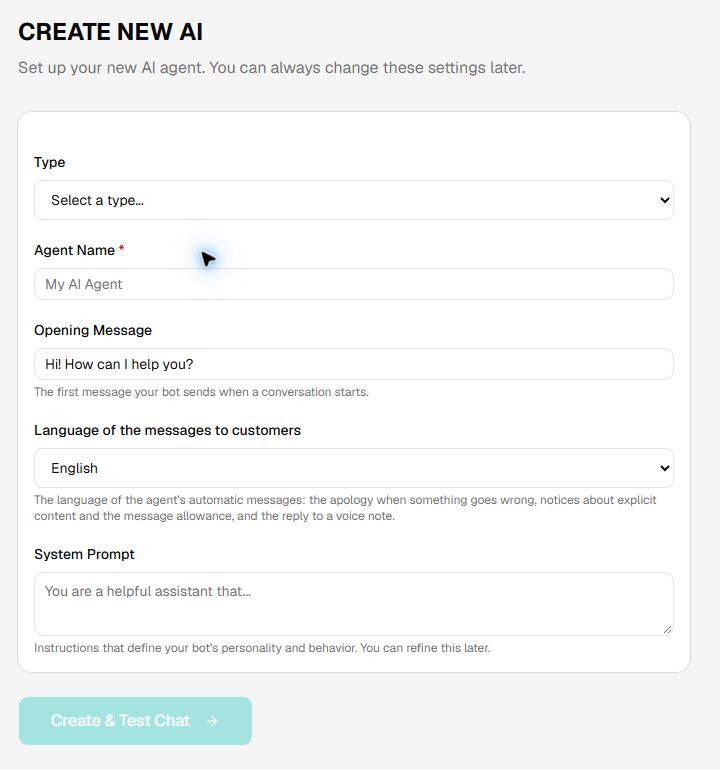
The starting point is its role
Its instructions, or prompt, are the starting point: much like a job description, they define the role, responsibilities, communication style and when to ask a person for help. Business documents and connected tools give it the knowledge and access needed for more specialized work.
Example role and responsibilities
Illustrative instructions. Knowledge, notifications and actions are connected to match the role.
The role determines the work. A personal assistant, receptionist, intake agent or customer-service agent uses the same platform with different instructions, knowledge and permissions.
The assistant answers calls, asks why someone is calling, captures messages and follows the configured screening or transfer rules. Creators receive the details without listening to every call.
It explains services and policies using business reference material, asks the required intake questions and captures the information a team needs to follow up.
It responds to incoming SMS and website chats. Recognized contacts can return or switch between connected channels while relevant conversation history remains available.
It sends authorized texts, approved booking links and conversation notifications. Connected calendars, CRMs and other tools extend the role to the specific actions included in the integration.
The creator can ask about messages across contacts, direct a follow-up and change the AI’s instructions, greeting or voice. Private access follows verification and assigned permissions.
Businesses use the assistant directly. Agencies, software companies and telecom operators can offer agents to their own customers through a branded builder and separate business workspaces.
The distinguishing product is the combination of communication channels, persistent relationships and operating controls in one configurable agent. These are the practical capabilities to compare when evaluating alternatives.
| Platform characteristic | What it enables |
|---|---|
| One agent across channels | The agent’s instructions and knowledge serve connected calls, texts and chats. A call can result in a text rather than ending at a spoken answer. |
| Memory organized around contacts | Earlier interactions inform later exchanges for recognized contacts. A customer following up by phone can continue the request already discussed over SMS. |
| Creator and contact relationships | The AI assists its creator privately while representing that person or business to others. History, settings and actions are available according to identity and permissions. |
| An operating platform around the AI | The builder includes knowledge management, conversation review, human takeover, notifications and API access. The creator can supervise and refine the assistant after launch. |
| The same foundation for direct use and resale | A business can use its own assistant; a partner can license the customer-facing builder and workspace model to provide a branded service to multiple businesses. |
Each agent has a saved role, instructions, knowledge and permissions. Its prompt describes the work it is responsible for, much like a job description; its knowledge supplies reference material, and its permissions define the actions it can take.
Each agent has its own role, tone, greeting, questions and handling rules. Saved instructions are editable as the creator refines the service or new situations emerge.
Voice and provider settings determine the supported spoken experience. Response controls and channel-specific instructions shape repetition, tone and the length of replies, including concise SMS responses.
Separate agents can represent different businesses, services or responsibilities, each with its own instructions and knowledge. A dedicated agent does not require a separately hosted model.
Practice conversations and reviewed responses give creators a way to evaluate behavior. Feedback and corrected answers supply examples for future handling without implying that the foundation model has been retrained.
These controls allow the role to evolve without rebuilding the underlying phone, messaging or knowledge infrastructure.
The knowledge base holds the reference information the agent consults: business services, policies, product information and other material that belongs outside its operating instructions.
| Source | What you provide | What it enables |
|---|---|---|
| Documents | TXT, PDF, DOCX, XLSX, CSV or RTF uploads; the displayed file uploader has a 10 MB limit. | Answer questions using your services, policies, manuals and other reference material. |
| Websites | A page or a website crawl, including recursive crawling where selected. | Use published business content as a knowledge source. Review and replace material as it changes. |
| Text and data feeds | Supplied text and supported feed sources, including CSV-based material. | Add structured information and content that is easier to maintain separately from the prompt. |
| Corrected responses | Feedback and preferred answers from practice or reviewed conversations. | Provide examples of how the agent should respond to similar requests. |
Retrieval-augmented generation selects relevant material from the agent’s knowledge base for a response. Source management supports removing or replacing outdated material. Indexed content reflects the supplied sources and refresh process; frequently changing information needs an appropriate update arrangement.
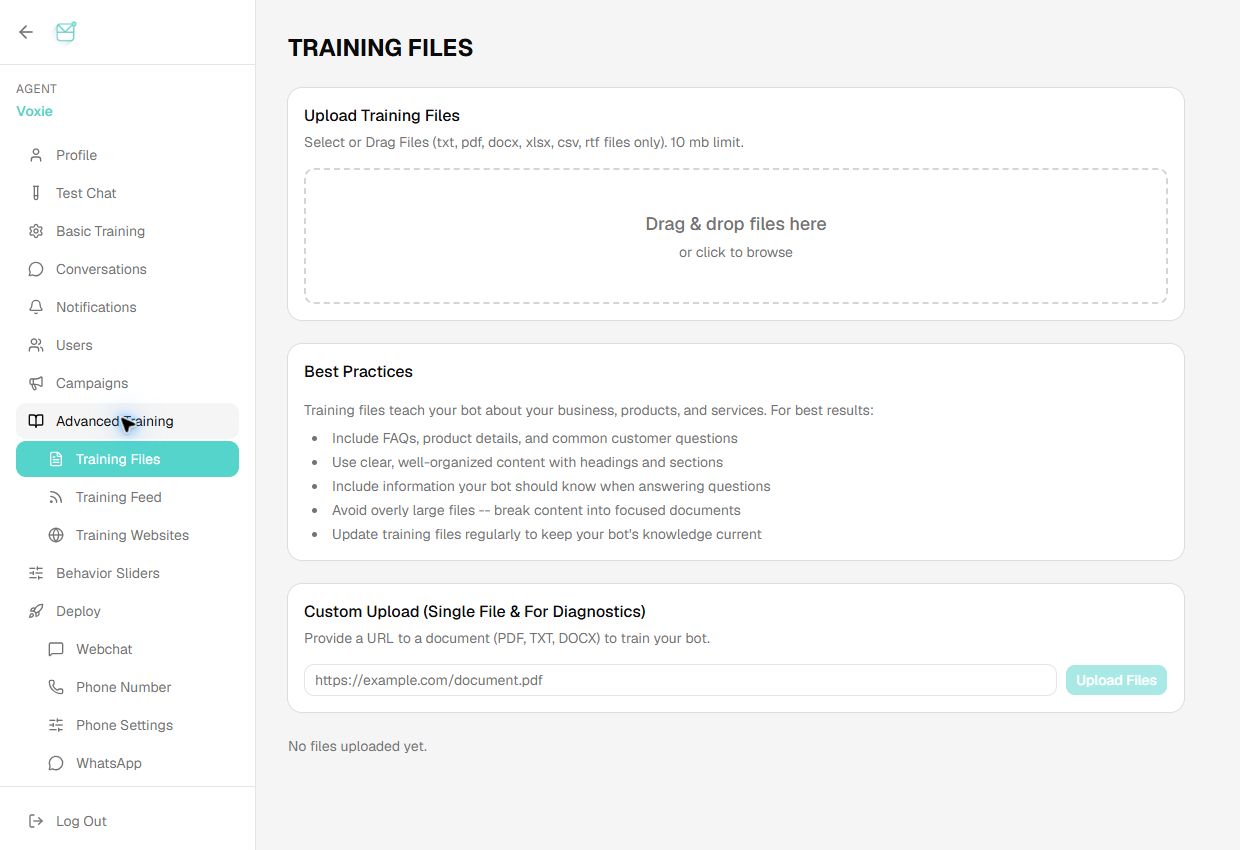
The Training Files screen accepts documents by drag-and-drop or document URL. The interface lists TXT, PDF, DOCX, XLSX, CSV and RTF uploads with a 10 MB limit, and provides guidance for organizing FAQs, product details and service information. These sources supply reference material for the agent’s responses.
Actual application screen · 20 October 2026An interaction belongs to a contact and an agent, rather than disappearing when a call or chat session ends. Saved history gives the agent context for follow-up conversations.
Recognized callers and texters are associated with available contact details and interaction history. The agent uses the context relevant to its relationship with that person.
Saved exchanges provide context when someone returns. A follow-up call can build on the request already captured rather than starting again.
A recognized contact can text a connected number and later call it. The agent can use the earlier SMS exchange during the call and send an authorized follow-up by text.
Records across contacts and supported channels give creators a view of open requests and past handling. This supports supervision, follow-up and refinement of the agent’s instructions.
A customer asks about an installation and gives their preferred date.
The same recognized contact calls the connected number. The AI uses the earlier request as context.
An enabled action sends the approved next-step link. The conversation remains part of that contact’s history.
Illustrative workflow. Identity matching and available history determine continuity. An anonymous website visitor is not automatically identified as a phone caller, and private creator access requires verification beyond caller ID.
The agent is available through connected phone and messaging channels. Inbound access and outbound actions have separate configuration and permissions.
| Channel | Configuration | User capability |
|---|---|---|
| SMS | A supported number, messaging instructions and usage limits. | Two-way text conversations, request capture and enabled follow-up messages. |
| Voice | Call routing, supported voice selection and handling or transfer rules. | Spoken call answering, intake and transfer to a person where the configured route supports it. |
| Web chat | A shareable agent link or embedded widget with colors, avatar and branding. | A website conversation entry point without a separate application build. |
| Email and WhatsApp | The selected account or channel connection for the deployment. | The agent’s instructions and knowledge applied to connected messaging channels. |
| API | Documented conversation and management interfaces. | Agent access within another application, with supplied identifiers for recognized contacts. |
Phone deployments use an available service number, a newly provisioned supported number or an existing number connected through a supported provider such as Twilio. Number capabilities, carrier requirements and routing determine whether SMS and calls are available on the same number.
Existing-number SMS hosting, number porting and conditional call forwarding are different arrangements. The business or operator deployment establishes the appropriate route. Outbound calling and campaign access follow account permissions and the agreed configuration.
The AI assists its creator privately and represents the creator or business to other people. Those relationships carry different access to history, settings and tools.
| Relationship | Available context and controls | Example |
|---|---|---|
| Verified creator | Private access to permitted contact histories; instructions, greeting and voice controls; authorized messaging and notification actions. | “Show me the outstanding requests, text this contact a reply, and shorten the greeting for new callers.” |
| Authorized staff | The conversations, settings and tools assigned to their role within the business workspace. | Review an assigned customer request and take over its conversation. |
| Customer or other contact | The context relevant to that contact, the agent’s assigned role and customer-permitted actions. | Ask a service question, leave a request or receive an approved booking link. |
A personal agent can use shared service access or have its own number. A business package adds the business workspace, team permissions and tool authority needed to represent an organization. The number alone does not define the permission model.
Conversation records, human takeover and notifications give creators a way to supervise the assistant after launch and improve its handling over time.
A person can pause AI replies for a conversation and respond directly. Staff can handle an exception while retaining the interaction record.
Configurable email summaries and PDF transcripts are delivered when a voice call ends or five minutes after the first SMS or web-chat message, according to the enabled settings.
A separate email alert notifies the team when a user needs human help. Authorized users can receive notifications and manage their preferences.
Conversation logs, message counts and activity metrics show how the assistant is being used. Actual requests and corrected responses inform improvements to prompts, knowledge and escalation rules.
Notifications let a creator supervise the service without remaining in the dashboard. They complement conversation access and human handoff; they do not replace an agreed process for responding to urgent requests.
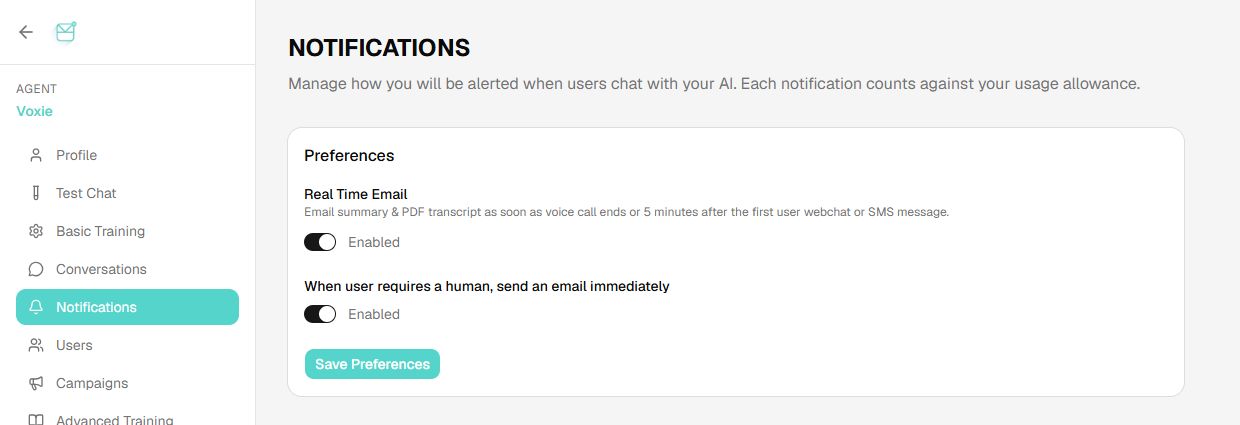
Notification preferences control email summaries and PDF transcripts after a voice call or five minutes after the first SMS or web-chat message. A separate setting enables immediate email when a user needs human assistance. The screen also states that notifications count against the usage allowance.
Actual application screen · 20 October 2026The assistant’s role can include authorized actions as well as conversation. Available destinations, credentials and tools determine what it can do.
An authorized action can send an SMS, deliver a notification email or text an approved calendar link during a call. The output channel can differ from the conversation channel.
Subscriber management and configured campaigns support outbound follow-up. Recipients reply in their own threads, where the agent can continue using available conversation history.
Authorized integrations connect selected calendars, CRMs, helpdesks and other software. Sharing a booking link and writing an appointment into a calendar are separate capabilities.
Tools and credentials are scoped to the agent or business workspace. Third-party function calls and MCP-based connections are selected and authorized for the deployment.
The integration scope specifies what the AI may read, what it may change, when staff approval is required and what happens if the action fails. Custom integrations are scoped separately from basic agent configuration.
The dashboard supports direct configuration; documented REST interfaces expose agent creation and operations to other applications. This enables the same platform to sit behind a CRM workflow, an internal tool or a customer-facing product.
| Interface area | What you can build | Representative API operations |
|---|---|---|
| Agent management | Create and configure agents, change instructions and greetings, and control response behavior. | /create_bot, /edit_prompt, /edit_opening_message |
| Training and knowledge | Upload reference material, connect website sources and manage training content. | /upload, /scrape_website, /add_feed |
| Conversations and users | Send conversation input, retrieve history, manage subscribers and support human participation. | /conversation_api, /get_conversations, /add_message_to_conversation |
| Numbers, SMS and voice | Connect supported numbers, send authorized messages and configure voice services. | /assign_phone_number, /direct_sms_api, /set_voice |
| Operations | Connect notification settings, usage information, webhooks and supported subscription workflows. | /get_usage, /edit_email_notification_settings, /set_webhook |
This supports a customer-facing application, a CRM workflow or a branded product built on the same agent infrastructure. Authentication, account permissions and individual endpoint behavior are specified in the API documentation; access is not granted merely by knowing an agent identifier.
API overview and authenticationFull API endpoint documentation
White-label licensing makes the customer-facing builder available under a partner’s brand. Subscribers personalize their AI through selected self-care controls; business customers manage their own agents and teams. The partner administers the service across accounts.
A branded browser portal exposes the greeting, instructions and personalization controls selected for the subscriber service. Operators can provision agents and entitlements through backend integration, with portal access added alongside launch or as a later enhancement.
Each business has a workspace for its agents, knowledge, connected channels and conversation records. Staff access follows the permissions assigned within that workspace.
Partner interfaces support customer provisioning and suspension, access management and service allowances. Customer lifecycle events connect through the agreed integration.
Agent configuration, contacts, history, knowledge and tool credentials belong to the corresponding business workspace and permission model.
The platform supports packages combining recurring AI service, usage, dedicated numbers, team access and paid integrations. Billing, branding, support responsibilities and administration scope are defined in the engagement.
A white-label engagement can include the existing customer-facing builder, business workspaces and platform APIs. A standard self-service subscription and an operator or reseller deployment are different commercial scopes.
Consumer AI and voicemail services can establish the initial routing, identity and operating processes. Business AI extends that foundation with dedicated business numbers, team permissions and connected systems.
Enterprise and operator deployments can place the platform and application data in an agreed environment, including the customer’s Azure, AWS, GCP or other cloud infrastructure.
Application hosting and AI model processing are separate choices. Speech and language services may process data externally under the agreed configuration; validated local models are another deployment option. Processing boundaries sit alongside storage, recording retention, access and deletion requirements.
The deployment specification covers launch channels and languages, number routing, contact identification, workspace permissions, enabled tools, retention, billing interfaces and handoff behavior. The complete workflow is validated with the intended users before access expands.
Available controls, channels and integrations depend on the plan and deployment scope. Speech and model providers are selected and validated for the launch languages, accents and expected conversation types.
The platform also manages saved agent instructions, knowledge retrieval, contact-linked history, channel connections, conversation review, human intervention, notifications and authorized actions. Those operating capabilities remain available after the initial call or text exchange.
No. Continuity requires a recognized contact, connected channels and accessible history. A phone number can identify a conversation participant without proving that the participant is the creator. Anonymous web sessions require an agreed identity link before private history can be shared.
Corrected responses and feedback provide reference material and guidance for the agent. They do not by themselves establish that the underlying foundation model has been fine-tuned.
Yes. White-label engagements can include the customer-facing builder, business workspaces and APIs. Branding, administration, provisioning, billing connections and hosting are specified in the engagement scope.
Use the builder directly, review the technical interfaces or discuss a branded deployment.
Discuss deployment requirements